How to · guide 12 of 12 · 5 min read
Risk-adjusted schedule export — the P80 deliverable
The analysis isn't finished until the planning team can open it. After any run, two buttons in the Results header turn the simulation into files the rest of the project actually uses — and neither ever touches your source schedule.
- P80 dates · CSV for Excel and dashboards. One row per activity: deterministic start/finish, P50 / P80 / P90 finishes, P80 start, delta in working days, and the criticality index. This is the file for the milestone tracker and the monthly report pack.
- P80 schedule · XER for Primavera. A fresh, P6-importable XER — calendar, WBS, activities, relationships — with every duration set to that activity's simulated P80 window. Import it alongside the deterministic programme as a target/what-if: the planner sees the risk-adjusted picture natively, in their own tool. The project is suffixed -P80 and the file is written from scratch — a read-only deliverable, never an overwrite.
- See it on the Gantt first. On 2 Schedule, the ▮ P80 view toggle overlays each activity's simulated P80 finish on the deterministic bars — the sanity check before the file goes out.
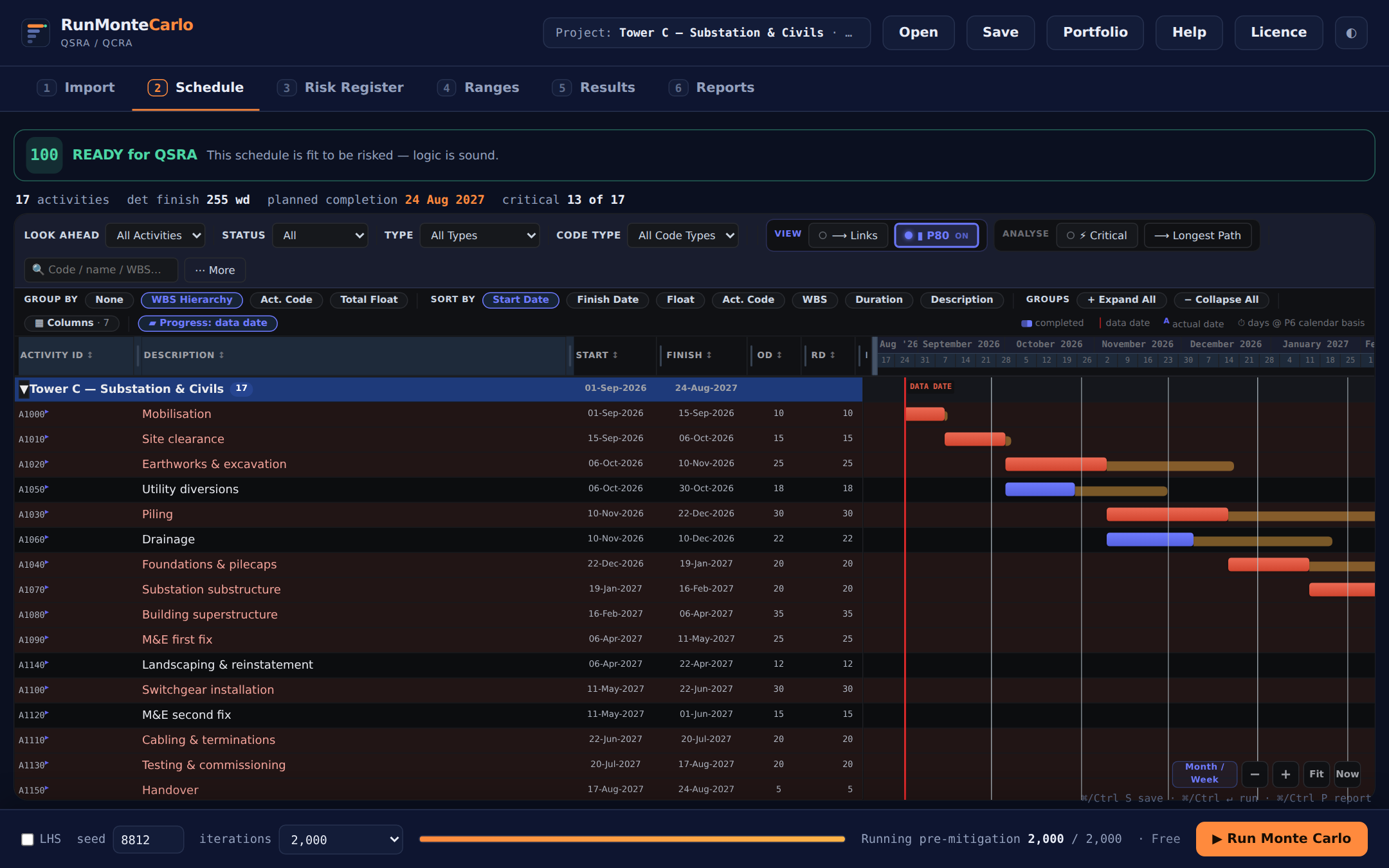 Deterministic bars with amber P80 extensions: where the risk actually lands, activity by activity.
 - Say which scenario it is. Exports carry the active scenario and seed (the status line confirms, e.g. "pre-mitigation, seed 8812"). Exporting post-mitigation dates as the commitment is a decision, not an accident — snapshot both and be explicit.
A P80 deliverable in contracts terms: pair the XER with the NEC programme risk report (guide 01, step 7) — Time Risk Allowance recommendation under clause 31.2, the register framed as Early Warnings, and terminal-float guidance, all from the same seeded run.
Export your first P80 schedule →