How to · guide 09 of 12 · 4 min read
Portfolio roll-up across projects
Three projects each at P80 are not a programme at P80 — the latest one finishes the portfolio, and the costs add. The roll-up resamples each project's stored distribution (4,000 draws, fixed seed) rather than naïvely adding percentiles, and treats projects as independent parallel programmes until you say otherwise.
- Run project A, add it. With a completed run on screen, click Portfolio in the top bar, then + Add current run.
- Repeat per project. Open the next .riskproj, run it, + Add current run again. Each row records the project's fitness verdict, P80 finish, P80 cost and contingency.
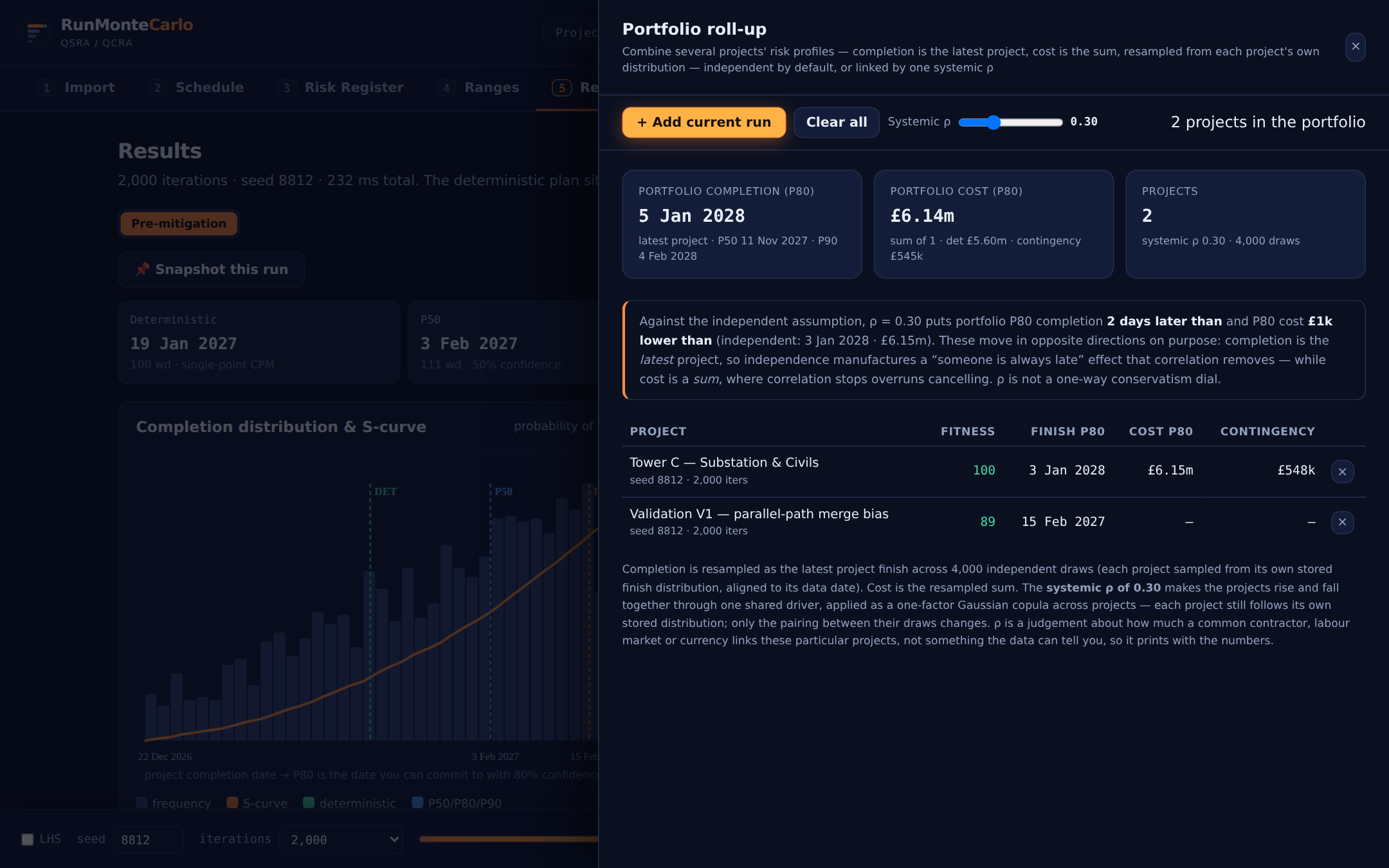 Completion is the latest project; cost is the sum — both from resampled distributions, not percentile arithmetic.
 - Model the shared driver with Systemic ρ. Independence is the documented default — but a common contractor, labour market or currency moves projects together. Slide ρ up and the drawer compares against the independent case. (Note the directions: shared upside/downside makes portfolio completion distributions tighter at the top but the cost tail fatter — the drawer explains as it goes.)
The portfolio lives in your browser (it spans multiple Risk Files, so it can't live in one) — it persists across sessions on the same machine but doesn't travel inside a .riskproj. Re-add runs after moving machines.
Roll up two projects →